Handle bans, appeals and wrong calls
Your staff work in your account with their own Discord sign in, one server at a time.
On this page
Overview
The switch at the top of Overview has two positions. A new server starts in Watching, and you can go back to it at any time.

- Watching
- FiveSpoof records who it would ban and stops nobody. With a plan, those players show in Cases a day later.
- Banning
- FiveSpoof bans returning players when they join. It needs a plan.
- To do
- Tells you when something needs you, such as an update. If most bans from one tool disappear at once, FiveSpoof keeps them, in case the ban file was wiped. If you deleted them on purpose, press They were deleted on purpose, or run the command the console shows.
Cases
Cases lists every player FiveSpoof banned or found suspicious, newest first.
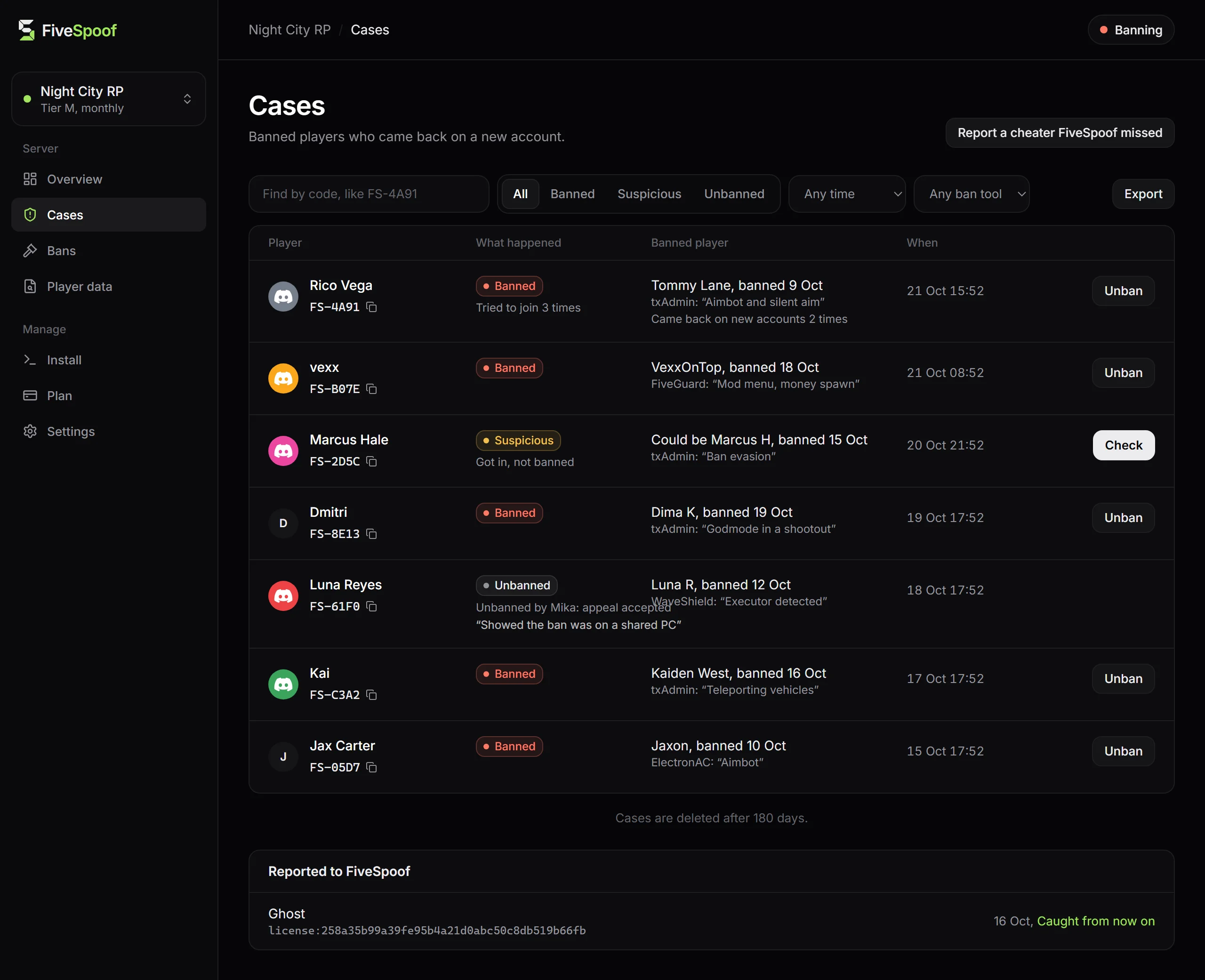
- Banned
- Banned when joining, until you let them in.
- Would be banned
- The same call while the server was Watching. Nobody was stopped.
- Suspicious, let in
- Not sure enough to ban. The player joined, and the case waits for you to press Check.
- Banned player
- The earlier ban this case is linked to. The question for you: is this the same person?
Search by the code a player gives you, filter the list, and export it as a spreadsheet file.
Check a suspicious player
Press Check to see the player and the banned player side by side, then choose:
- Ban them
- Bans the account until you let it in. A player who is online is removed within five minutes.
- Not the same person
- FiveSpoof stops marking them for that ban.
- They are fine
- For a case without a banned player, such as NUI DevTools. FiveSpoof stops marking or removing that account for it.
Each choice asks why in one click, so the next person on your staff sees who decided and why.
A player opens NUI DevTools
On Banning, a player who opens NUI DevTools, a tool cheaters use, is removed within seconds and gets a code. They can join again at once. On Watching, they are only marked for your staff.
- Your own staff
- Find the case by the code on their screen, press Check and then They are fine.
- Mark only, never remove
- Cheat tool check in Settings under Players switches the removals off.
Trusted players
In Settings under Players, add the accounts FiveSpoof should never ban, remove or mark, such as
your staff and test accounts, by an identifier such as license: or discord: and the ID.
A player says the ban is wrong
- Ask for the code. It is on the player's screen and looks like
FS-4A91. - Find the case. Type the code into the search in Cases, or follow the link in the Discord message.
- Check the ban. Look at Banned player and ask what you would ask in any ban appeal.
- Unban them if it is wrong. Press Unban, or run fivespoof unban FS-4A91 in the server console. FiveSpoof does not ban them for that ban again.
For a player with several accounts, open their profile from Cases and press Unban all accounts. If the code shows a ban instead of a case, the player's own account is banned on your server: lift it in the tool that made it.
Wrong calls usually come from a shared PC, such as a sibling's or a flatmate's, or from a PC bought second hand. Ask how they know the banned player. A real second person can answer that.
If nobody does anything, the FiveSpoof ban lasts as long as the original ban, and it is checked again every 7 days. Lift the original ban where it was made, and every FiveSpoof ban linked only to it ends too.
Do not tell the player who the earlier banned player is. If they are two different people, that name is someone else's personal data.
Report a player FiveSpoof missed
Press Report a cheater FiveSpoof missed in Cases and give the new account and, if you know it, the banned one. The FiveSpoof team looks at every report. To keep the player out now, ban the new account in your ban tool.
Player data
When a player asks what you store about them, look them up in Player data by their account identifier. You get what is stored on your server, when it will be deleted, and an answer you can copy to the player.
Settings
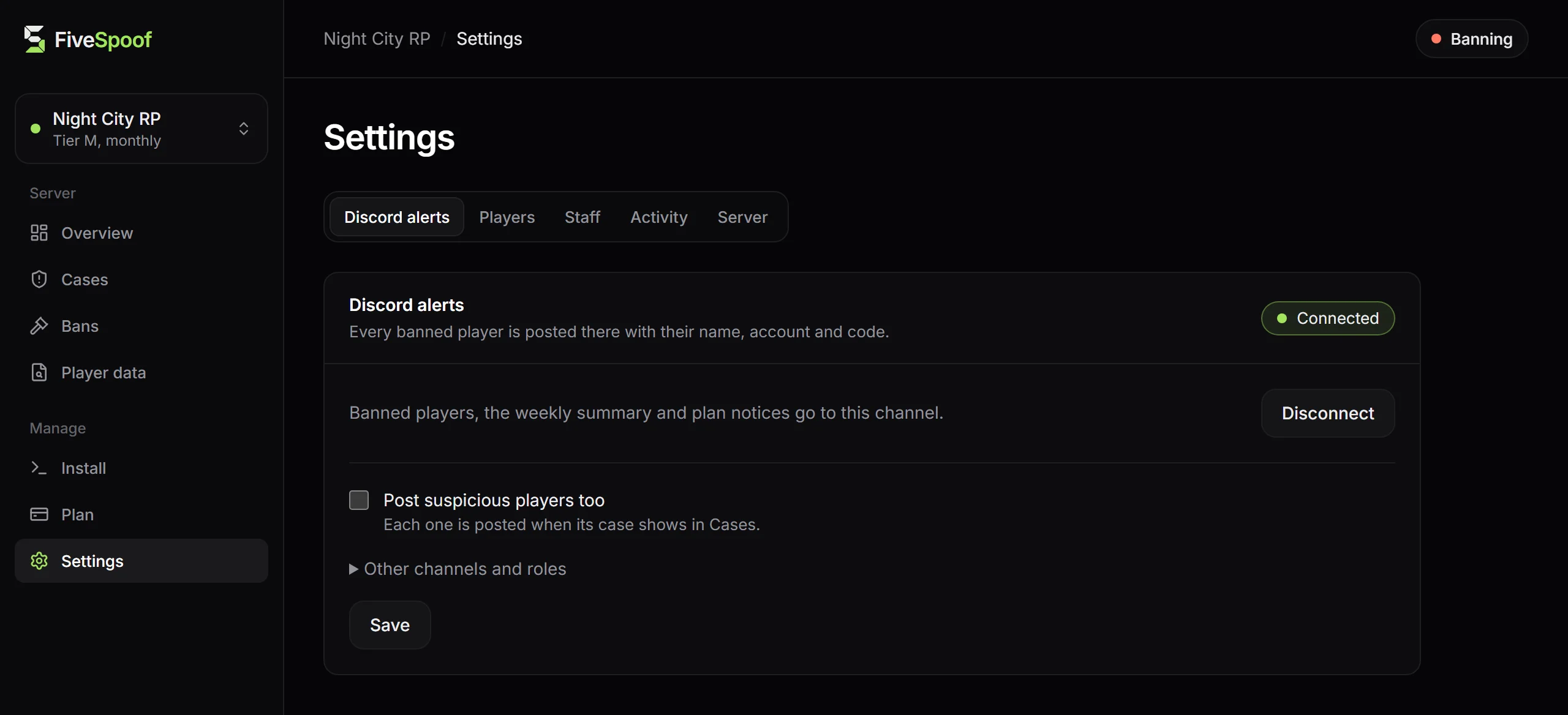
- Discord alerts
- Paste a channel webhook and press Connect. Each newly banned player is posted with name, account, code and a link to the case, never the reason. Changes that affect protection are posted too, so a change you did not make shows at once.
- Staff
- Invite staff makes a link for one person, valid once for 48 hours. New staff start on View only, and you can let them check suspicious players or let players in. Nobody can let in a player they banned themselves.
- Activity
- Sign ins and every change that affects protection. If you see a change you did not make, press Sign out everywhere, make a new connect command under Install and change your Discord password.
- Server
- Delete server removes everything FiveSpoof stores for the server. Cancel a running plan first.